

 Open Access||Research Article
AI Powered Gesture Control for Public Touchscreens
Samyak Kasliwal, Maaz Khan, Karan Gaikwad, Aryan Khadsang, Sarthak Khairmode, Vaishali Rajput , Parikshit Mahalle
The Department of Artificial Intelligence & Data Science (AI & DS), Vishwakarma Institute of Technology (VIT), Pune, Maharashtra, 411037, India
Abstract
Public touchscreen devices such as information kiosks, ticketing machines, and digital terminals have become a common part of everyday life, but their frequent use by different people also raises concerns about hygiene, accessibility, and the need for physical contact. Although touchless interaction can address these concerns, creating a gesture-based system that works reliably in a public environment is challenging because natural hand movements, changes in lighting, background distractions, and unintended gestures can lead to incorrect actions. To address this problem, this work presents an AI-powered, vision-based gesture control system designed to provide a touchless alternative to conventional public touchscreen interaction using only a standard webcam. The system uses Google's MediaPipe Hand Landmarker to track 21 hand landmarks in real time and converts simple hand gestures into actions such as cursor movement, left and right clicking, scrolling, dragging, and user-defined commands. To make the interaction more stable and dependable, the system combines OneEuro filtering to reduce hand jitter, confidence-based intent detection and velocity gating to prevent accidental actions, and a physics-based cursor model to produce smoother and more natural pointer movement. A gesture learning module also allows users to define personalized gestures without retraining the underlying model, while context-aware actions enable the same gesture to perform different functions depending on the active application. The developed system demonstrates that a software-only approach using a regular webcam can provide responsive and practical touchless interaction without requiring specialized sensors or modifications to existing terminal hardware. The results show its potential as a more hygienic, accessible, and user-friendly interaction method for public-facing computing environments.
Keywords
Graphical Abstract
Novelty Statement
A webcam-based AI gesture system enables hygienic touchless public-terminal control using adaptive learning, filtering, confidence detection, and context-aware actions.
1. Introduction
Human-computer interaction (HCI) has undergone significant transformation over the past decade, evolving from keyboard-and-mouse paradigms toward more natural, intuitive modalities such as touch, voice, and gesture-based control.[1-3] While touchscreen interfaces have achieved widespread adoption in public environments including kiosks, information terminals, ticketing machines, and digital signage they raise hygiene and accessibility concerns.[4,5] Physical contact with shared surfaces facilitates the transmission of pathogens, a concern that became critically prominent during and after the COVID-19 pandemic.[6,7] This has increased interest in contactless interaction technologies that avoid physical touch.[22,23] Gesture-based interfaces offer a potential solution to this problem.[10] By interpreting the natural movements of the human hand through a camera, such systems remove the need for physical contact with a device[11] and are generally expected to be intuitive to learn, although usability was not evaluated in this work. However, deploying reliable gesture control in real-world public environments introduces a distinct set of engineering challenges: variable lighting conditions, uncontrolled backgrounds, involuntary hand movements, accidental gesture triggering, and the need for low-latency response on commodity hardware.[12] This paper presents AI-Powered Gesture Control for Public Touchscreens, a vision-based hand gesture control system designed to replace or augment physical touch interaction in public-facing computing environments. The system is designed to process webcam frames continuously in an interactive loop; in dry-run evaluation its measured processing throughput had a pooled median of 22.09 frames/s, with per-frame processing latency of 30.53 Ms (median) and 44.97 Ms (95th percentile) over 26,049 frames on a single machine with unspecified hardware. These are dry-run processing measurements rather than end-to-end user-perceived response times, so real-time responsiveness on any specific deployment hardware remains to be established. The system utilizes Google's Media Pipe Hand Landmarked model to extract 21 three-dimensional skeletal landmarks from the human hand in real time via a standard webcam, requiring no specialized depth sensors or proprietary hardware. Built entirely in Python using OpenCV and PyAutoGUI, the system is designed as a software-only application for webcam-equipped terminals; deployment on public terminal infrastructure was not tested. The system was developed through two iterative versions. The first version establishes a multi-mode interaction framework supporting cursor movement, left and right click via pinch gestures, scroll mode, and a safety pause state. The second and primary version, architecturally redesigned as a modular pipeline, introduces a One Euro filter intended to reduce jitter, a confidence-bucket intent classification engine with velocity gating intended to limit accidental activations, a physics-based cursor model with simulated mass and friction intended to stabilize pointer motion, a cinematic heads-up display (HUD) for real-time visual feedback, and a gesture learning subsystem enabling user-defined custom gesture vocabulary stored persistently in a JSON-based format.
The key contributions of this work are as follows:
- A software-only, webcam-based gesture control pipeline designed for standard webcam-equipped terminals; deployment on a public terminal was not tested.
- A confidence-accumulation based intent engine, designed so that a click action is dispatched only after gesture evidence accumulates across several frames rather than from a single-frame threshold, with the intent that momentary false pinch detections are less likely to trigger an accidental click than in a threshold-only design; no comparison against a threshold-only baseline has been measured in this work, so no reduction in false click activations has been demonstrated.
- A physics-driven cursor model implemented with the aim of stabilizing pointer motion under hand tremor; its benefit was not evaluated against a direct-mapping baseline.
- A modular, extensible architecture that supports runtime gesture learning without retraining any underlying model.
- A prototype implementation and preliminary dry-run evaluation of Media Pipe-based hand tracking for the public touchscreen replacement use case.
The remainder of this paper is organized as follows. Section 2 reviews related work in gesture recognition and touchless interfaces. Section 3 describes the overall system architecture. Section 4 presents the concepts applied, and Section 5 describes the per-frame workflow of the system. Section 6 reports the experimental setup, evaluation protocol, results and discussion. Section 7 discusses challenges, evaluation limitations and future work, and Section 8 concludes the paper.
2. Literature review
The field of gesture-based human-computer interaction has been an active area of research for several decades, with significant advances occurring as computer vision hardware and machine learning frameworks became increasingly accessible. This section reviews the most relevant bodies of work across four themes: hand tracking and landmark detection, gesture recognition methodologies, signal smoothing and cursor stabilization, and touchless interfaces for public environments.
2.1 Hand tracking and landmark detection
Early hand tracking systems relied heavily on colour-based segmentation, background subtraction, and depth sensors such as the Microsoft Kinect.[13] While effective in controlled environments, these approaches are generally reported to generalize poorly under variable lighting and cluttered backgrounds. The introduction of depth cameras enabled more robust skeleton extraction but imposed additional hardware cost and deployment constraints. A major development in modern hand tracking was Media Pipe Hands, introduced by Zhang et al. in 2020.[14] This framework reported real-time detection of 21 hand key points from a single RGB camera using a two-stage pipeline: a palm detector followed by a landmark regression network. The subsequent Media Pipe Hand Landmarked API, which this work employs, offers a VIDEO running mode that uses temporal information across frames. A pre-trained, lightweight model file designed to run without GPU acceleration may make the framework attractive for resource-constrained settings such as public kiosks, although suitability for kiosks was not evaluated here.
2.2 Gesture recognition methodologies
Gesture recognition approaches broadly fall into three categories: rule-based geometric methods, classical machine learning classifiers, and deep learning models. Rule-based methods, which compute explicit geometric features such as inter-landmark distances, finger extension ratios, and angular relationships, remain widely used due to their interpretability, low computational overhead, and absence of training data requirements.[15] The pinch detection mechanism employed in this system computing the Euclidean distance between thumb and index finger landmarks is representative of this approach. Machine learning-based classifiers, including Support Vector Machines (SVMs) and Random Forests trained on hand landmark feature vectors, have been reported to perform well on static gesture recognition tasks.[16] Dynamic gesture recognition, which requires temporal modelling of landmark sequences, has been addressed through Hidden Markov Models (HMMs) and, more recently, through recurrent neural networks (RNNs) and Long Short-Term Memory (LSTM) networks.[17] While these approaches offer greater expressiveness, they introduce training data collection burdens and inference latency that complicate deployment on edge hardware. A relevant design idea is evidence accumulation for gesture intent classification. Rather than triggering an action on a single-frame threshold crossing, confidence accumulation integrates evidence across multiple frames. Real-time gesture recognition systems such as that of Köpüklü et al. likewise make multi-frame decisions, using sliding-window detector and classifier queues with post-processing and a single-time activation mechanism so that each performed gesture is activated once; that work is based on 3D CNN models and does not evaluate a pinch-confidence accumulator or demonstrate a false-positive reduction from the mechanism used here.[18] The intent engine in this paper applies multi-frame accumulation as a design rationale, namely that a click should be registered only after sustained evidence, and adds a velocity gate that suppresses click accumulation during rapid hand movement. The effect of this design on false positives was not measured in this work.
2.3 Signal smoothing and cursor stabilization
A persistent challenge in webcam-based cursor control is the translation of noisy, jittery landmark coordinates into stable, usable pointer positions. Casiez et al. introduced the 1€ Filter (One Euro Filter), an adaptive low-pass filter that dynamically adjusts its cutoff frequency based on the signal's instantaneous velocity.[19] At low velocities, strong smoothing suppresses jitter; at high velocities, the filter relaxes to preserve responsiveness. This filter is widely used in interactive systems, and it is applied in this work to address the tremor and quantization noise in Media Pipe landmark output; its effect here was assessed only in a single stationary-hold pilot (Section 6.5). Physics-based cursor models, which simulate Newtonian dynamics including mass, momentum, and friction, represent a complementary approach to stability. By giving the cursor virtual inertia, abrupt directional changes caused by hand micro-movements are naturally attenuated while intentional large movements remain responsive. Prior work in pointing facilitation, including the Bubble cursor technique, has examined how cursor behaviour can affect target acquisition, although it does not use inertial dynamics.[20] The physics-based cursor implemented in this system is therefore motivated as a design rationale for attenuating jitter rather than by direct evidence from.[21]
2.4 Touchless interfaces for public environments
The design of touchless interfaces for public kiosks and shared terminals has received growing attention, particularly following the COVID-19 pandemic. The multi-mode interaction design adopted in this work uses distinct cursor, scroll, and pause states. This design is intended to reduce the cognitive load associated with continuous gesture maintenance. Leap Motion Controller-based systems have been demonstrated for contactless ATM and touchless elevator interaction, but they depend on dedicated hardware.[21,22] Vision-only approaches using standard RGB cameras, as proposed in this work, may be more economical to deploy at scale and require no modification to existing terminal hardware beyond software installation and a camera; economic viability was not assessed. Accessibility considerations further motivate touchless gesture interfaces. Users with motor impairments that prevent reliable touchscreen contact, individuals with prosthetics, and elderly users with reduced fine motor control may benefit from gesture-based alternatives; touch-free gesture interaction for users with dexterity impairments is examined in.[23] The user-defined gesture learning subsystem introduced in this work is intended to support accessibility by allowing individuals to define gestures suited to their physical capabilities; this was not evaluated with users.
3. System design and architecture
3.1 Design philosophy and goals
The architecture of the AI-Powered Gesture Control system for public touchscreens was guided by four primary design principles. First, modularity each functional concern is encapsulated in an independent, replaceable module, allowing individual components to be upgraded or substituted without affecting the rest of the pipeline. Second, low latency the system is designed to minimize end-to-end delay from hand movement to cursor response, targeting real-time performance on commodity hardware without GPU acceleration. Third, robustness the system must tolerate natural hand tremor, involuntary micro-movements, transient pose ambiguity, and temporary hand occlusion without producing erratic cursor behaviour or false activations. Fourth, deploy ability- the entire system operates as a pure software installation on any webcam-equipped machine, imposing no hardware modification requirements on existing public terminal infrastructure. These are design goals; Section 7 reports which of them were measured and which were not. These principles directly shaped the five-module pipeline architecture described in this section.
3.2. High-level system overview
The system operates as a continuous real-time loop that ingests raw webcam frames and produces mouse control outputs. The processing pipeline is illustrated conceptually as a sequence of stages:
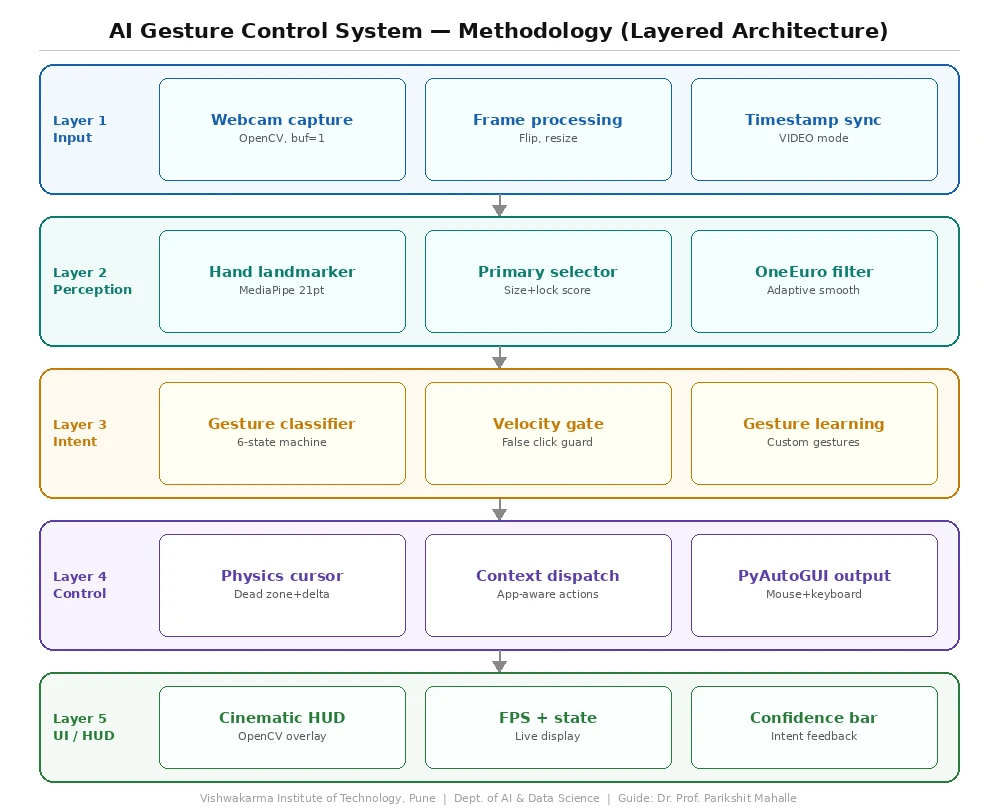
Each frame captured from the webcam passes through the perception layer, which extracts hand landmark coordinates and applies signal smoothing. The smoothed landmarks are forwarded to the intent classification layer, which determines the user's current gestural intent using a stateful confidence accumulation model. The resolved intent is passed to the control layer, which updates cursor position and executes mouse actions through PyAutoGUI. Simultaneously, the HUD layer renders real-time visual feedback onto the camera preview frame displayed to the user. The layered architecture is summarized in Fig. 1.
Fig. 1: Layered architecture of the gesture control system, showing the input, perception, intent, control, and UI/HUD layers and the components within each layer.
3.3. Module descriptions
3.3.1 Perception layer (perception/)
The perception layer is responsible for transforming raw camera frames into reliable, noise-reduced hand landmark data. It consists of two components.
Hand tracker (tracker.py): This component wraps the Media Pipe Hand land marker API. The land marker is initialized in VIDEO running mode, which is intended to exploit temporal consistency across successive frames and produce more stable landmark sequences than IMAGE mode; this benefit was not measured here. The tracker is configured to detect up to the number of hands specified in the system configuration, with detection, presence, and tracking confidence thresholds each set to 0.5. A Smart User Lock system is implemented within the tracker: once a primary hand is identified, the system locks onto it and maintains tracking continuity for a configurable timeout period, intended to prevent erratic switching between detected hands. The tracker returns a Hand Detection Result object containing the full landmark list, the index of the primary hand, and the computed hand size metric used for distance normalization.
One euro smoother (smoothing.py): Raw landmark coordinates output by Media Pipe contains quantization noise and frame-to-frame jitter that, if used directly, produce an unstable, vibrating cursor. The One Euro Filter is applied to the normalized (x, y) coordinates of the index fingertip landmark before they are forwarded downstream. The filter's minimum cutoff frequency (min_cutoff) and speed coefficient (beta) are exposed as tenable configuration parameters, allowing the balance between smoothing strength and responsiveness to be adjusted for different deployment environments.
3.3.2. Intent classification layer (intent/)
The intent classification layer interprets the geometric state of the smoothed hand landmarks and produces a discrete gestural intent label. This is the module most responsible for unintended actions, because its false-positive behaviour directly affects how often the system could perform unintended clicks or actions.
Gesture classifier (classifier.py): The classifier implements a four-state finite state machine with the states: IDLE, HOVER, CLICK_PENDING, and CLICK. State transitions are governed by two concurrent signals.
The first signal is pinch distance, computed as the Euclidean distance between the thumb tip (landmark 4) and the index fingertip (landmark 8) for left-click detection, and between the thumb tip and the middle fingertip (landmark 12) for right-click detection. These distances are evaluated in normalized landmark coordinate space, which is intended to reduce dependence on camera resolution; invariance to hand distance from the camera was not tested. The second signal is a velocity gate. The instantaneous wrist velocity is computed from the displacement of landmark 0 (wrist) between successive frames, divided by the elapsed time. If wrist velocity exceeds a configured threshold, confidence accumulation is suppressed entirely, which prevents click registration during rapid hand movements; rapid movement is expected to be a source of accidental activations in simpler threshold-based systems. When both the pinch distance falls below the configured threshold and wrist velocity is within the stable range, a pinch confidence score is incremented by a growth constant each frame. If the pinch breaks or velocity spikes, the confidence score decays by a decay constant each frame. When confidence reaches 1.0, the state transitions to CLICK and the corresponding mouse action is dispatched. This temporal integration mechanism requires the pinch gesture to be held stably across multiple frames before registering, which is intended to reduce false activations from transient pose coincidences. The corresponding hold time depends on CONFIDENCE_GROWTH and the achieved frame rate; an approximate design estimate of 200–300 ms was not verified against logged timestamps, and the effect on false activations was not measured.
3.3.3 Control layer (control/)
The control layer translates the abstract intent labels and cursor position targets from upstream modules into concrete operating system mouse events.
Physics cursor (mouse_physics.py): Rather than mapping the index fingertip position directly to screen coordinates — which can produce jittery cursor movement - the physics cursor model introduces virtual Newtonian dynamics. The cursor is modelled as a point mass with configurable mass and friction coefficients. Each frame, a force vector is computed from the displacement between the cursor's current screen position and the target position indicated by the fingertip landmark. This force accelerates the cursor velocity, which is then attenuated each frame by the friction coefficient. The resulting motion is designed to show smooth acceleration toward the target and gradual deceleration, intended to attenuate high-frequency positional noise while remaining responsive to deliberate directional changes. PyAutoGUI's move to function is used to apply the computed cursor position to the operating system.
3.3.4 Gesture learning subsystem (gesture_learning.py)
The gesture learning subsystem enables the system to recognize user-defined custom gestures at runtime without any model retraining. When the user presses the 'S' key during operation, the current hand landmark
configuration is captured and stored as a named gesture entry in a JSON vocabulary file (gestures.json). During subsequent operation, incoming landmark configurations are compared against all stored gesture templates using a geometric similarity metric. When a match above a configurable confidence threshold is detected, the corresponding custom action is triggered. This subsystem is intended to allow the interface to be personalized to individual users' physical capabilities and preferred gesture vocabulary, which may be relevant to accessibility applications; this was not evaluated with users.
Table 1: Key configuration parameters defined in config.py
| Parameter | Description |
|---|---|
| TARGET_FPS | Camera capture frame rate target |
| PINCH_THRESHOLD_NORM | Normalized distance threshold for pinch detection |
| CONFIDENCE_GROWTH | Per-frame confidence increments during stable pinch |
| CONFIDENCE_DECAY | Per-frame confidence decrement when pinch breaks |
| ONE_EURO_MIN_CUTOFF | One Euro filter minimum cutoff frequency |
| ONE_EURO_BETA | One Euro filter speed coefficient |
| SMOOTHING_FACTOR | Cursor smoothing strength |
| SCROLL_SPEED | Scroll mode sensitivity |
| GESTURE_COOLDOWN | Minimum interval between successive click events |
| MAX_DETECTED_HANDS | Maximum number of hands tracked simultaneously |
3.3.5 HUD layer (ui/)
Cinematic HUD (hud.py): The heads-up display module renders real-time diagnostic and feedback label, per-finger tracking indicators, the pinch confidence progress indicator (a dynamic reticle that contracts and changes colour from neutral to orange to red as click confidence accumulates), finger trail visualizations, and frame rate display. The HUD serves a dual purpose: it provides the user with immediate visual confirmation of the system's interpretation of their gestures, intended to reduce the learning curve for new users (usability was not evaluated), and it provides developers and operators with real-time diagnostic visibility into system state during development and testing.
3.4 System configuration
All tenable system parameters are centralized in a single config.py file. Key parameters are listed in Table 1. This centralized configuration approach allows system operators to adjust behaviour for specific deployment environments. For example, a larger CONFIDENCE_GROWTH would let a click register after fewer frames, favouring faster interaction, whereas a larger CONFIDENCE_DECAY would make accumulated confidence fall faster when a pinch breaks, favouring fewer accidental clicks; a smaller PINCH_THRESHOLD_NORM would require a closer pinch. These are possible tuning directions only; their effects were not evaluated.
3.5 Interaction state machine
At the top level, the system maintains a global interaction state that governs which gestures are active and how inputs are interpreted: Table 2 lists the states, their triggers and the resulting behaviour.
Table 2: Global interaction states, their triggers, and resulting behaviour
| State | Trigger | Behaviour |
|---|---|---|
| ACTIVE | System start / toggle key | Full gesture control enabled |
| HOVER | Hand detected, no pinch | Cursor tracks index fingertip |
| CLICK_PENDING | Pinch detected, confidence accumulating | Reticle shrinks, colour shifts |
| CLICK | Confidence reaches 1.0 | Mouse click dispatched; cooldown starts |
| PAUSED | Closed fist gesture | All control suspended, border turns red |
| IDLE | No hand detected | Cursor stationary, no actions |
3.6 Technology stack
Table 3 presents the technology stack used to develop the proposed prototype for gesture-based mouse control. Python serves as the primary implementation language, while MediaPipe and OpenCV handle hand landmark detection, image capture, and real-time image processing. The One Euro Filter is used to smooth hand movements, while PyAutoGUI and PyGetWindow facilitate mouse control and window management. Gesture configurations are stored in JSON format, enabling structured data management. The prototype is designed to operate on Windows and Linux systems equipped with a webcam, providing a flexible and accessible solution for touchless human–computer interaction.
Table 3: Technology stack of the prototype
| Component | Technology |
|---|---|
| Hand Landmark Detection | Media Pipe Hand Landmarker (float16) |
| Image Capture & Processing | OpenCV (cv2) |
| Signal Smoothing | One Euro Filter (custom implementation) |
| Mouse Control | PyAutoGUI |
| Window Management | PyGetWindow |
| Gesture Storage | JSON |
| Implementation Language | Python 3.8+ |
| Target Platform | Windows / Linux (webcam-equipped) |
4. Concepts applied
4.1 Computer vision
Real-time frames are captured via OpenCV at 640×480 resolution with a single-frame buffer intended to minimize latency. Media Pipe landmarks are output in normalized (0,1) coordinate space and linearly mapped to screen coordinates at runtime. Pinch gestures are detected using Euclidean distance between landmark pairs in normalized space, which is intended to reduce dependence on camera resolution; invariance to camera distance was not tested.
4.2. Machine learning
The system deploys Google's pre-trained Media Pipe Hand Landmarked — a two-stage CNN that detects 21 hand key points per frame (float16 model variant; the execution device was not recorded).[24] Using a pre-trained model avoids the need to collect a custom landmark dataset. Custom gestures are matched at runtime against stored landmark templates using geometric similarity, analogous to k-NN classification, with no retraining required.
4.3. Signal processing
The One Euro Filter is applied to landmark coordinates, dynamically adjusting its cutoff frequency with signal speed strong smoothing when the hand is still, low latency when moving fast. A velocity gate suppresses click confidence accumulation when wrist velocity exceeds a threshold, intended to prevent accidental activations during rapid movements.
4.4. Physics simulation
The cursor is modelled as a point mass driven toward the fingertip target by a spring-like force, attenuated each frame by a friction coefficient. This is intended to produce smooth, momentum-driven motion that attenuates high-frequency noise while remaining responsive to deliberate movement.
4.5. Finite state machine and confidence accumulation
The intent engine runs a four-state FSM: IDLE → HOVER → CLICK_PENDING → CLICK. Click decisions use temporal evidence integration — confidence increments each frame a stable pinch is held and decays when released. A click fires only after sustained pinch evidence has accumulated over multiple frames (the hold time was not measured; see Section 3.3), which is intended to reduce false activations; no baseline comparison was run.
4.6. HCI principles
Mode-based interaction separates cursor, scroll, and pause states, which is intended to limit accidental actions. The HUD reticle provides progressive visual feedback as click confidence builds, intended to compensate for absent tactile feedback. Physics smoothing is intended to reduce endpoint jitter, which would be expected to benefit pointing performance; pointing performance was not measured. The gesture learning subsystem is intended to support diverse users by allowing a personalized gesture vocabulary; this was not evaluated with users.
4.7. Software engineering
The system applies separation of concerns across five independent modules (perception, intent, control, UI, gesture learning), configuration-driven design via a centralized config.py, and JSON-based lightweight persistence for custom gesture templates.
5. Workflow
The core system loop, summarized in Fig. 2, executes the following sequence every frame:
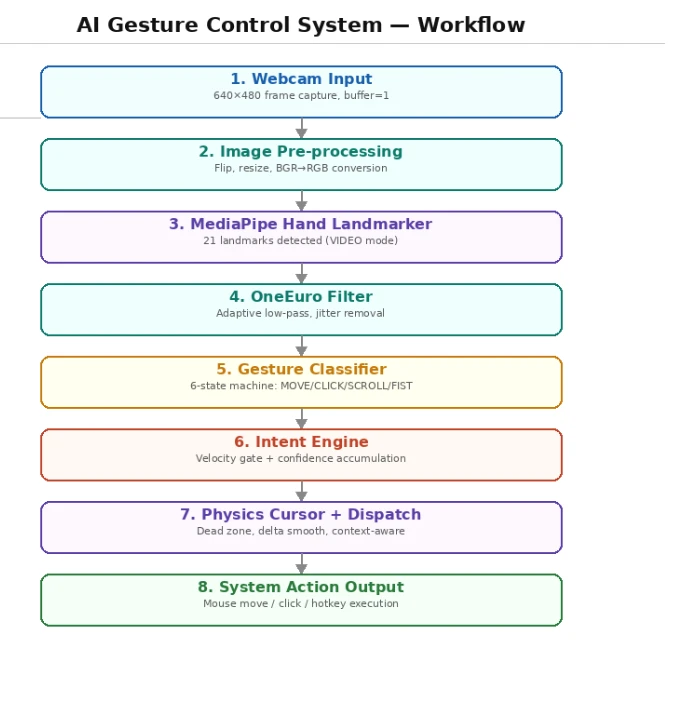
Fig. 2: Workflow of the gesture control system, from webcam input and image pre-processing through hand landmark detection, OneEuro filtering, gesture classification, intent engine, and physics cursor with context-aware dispatch, to system action output.
Step 1- Frame Capture: A raw BGR frame is captured from the webcam and flipped horizontally to produce a mirror view, which is intended to be more intuitive for users controlling a cursor.
Step 2 - Hand Detection: The frame is converted to RGB and passed to the Hand Tracker, which submits it to the Media Pipe Hand land marker with the current video timestamp. The land marker returns a HandDetectionResult containing the 21 normalized landmark coordinates of the detected primary hand.
Step 3- Landmark Smoothing: The (x, y) coordinates of the index fingertip landmark (index 8) are passed through the OneEuroFilter. The smoothed coordinates are used as the cursor target position for the current frame.
Step 4- Intent Classification: The full landmark list is passed to GestureClassifier.process(). The classifier computes pinch distances, evaluates wrist velocity, updates the confidence score, and returns the current FSM state and metadata dictionary containing pinch type and confidence level.
Step 5- Cursor and Action Execution: Based on the classifier output, the Physics Cursor updates cursor position toward the smoothed fingertip target. If the FSM state is CLICK and the gesture cooldown has elapsed, pyautogui.click() or pyautogui.rightClick() is dispatched based on the detected pinch type. A timestamp is recorded to enforce the cooldown interval.
Step 6- Custom Gesture Check: The current landmark configuration is passed to Gesture Learning for comparison against stored templates. If a match is found above the similarity threshold and the custom gesture cooldown has elapsed, the associated action is triggered.
Step 7- HUD Rendering: The Cinematic HUD renders all visual overlays onto the frame including system state, confidence reticule, finger trails, and FPS counter. The annotated frame is displayed via cv2.imshow().
Step 8 - Keyboard Input Handling: Key events are checked each frame. Q triggers a clean system shutdown. S saves the current landmark configuration as a named custom gesture to gestures. Json.
6. Experimental setup, results and discussion
6.1 Experimental setup and reproducibility
All human measurements reported in this paper were obtained with a dry-run webcam evaluation harness, which exercises the perception and intent pipeline but does not establish actual operating-system action dispatch. The prototype was implemented in Python 3.8 or later using OpenCV for webcam capture, the Google MediaPipe Hand Landmarker for 21-point hand landmark estimation, a custom OneEuro filter for landmark smoothing, a rule-based finite-state intent classifier with confidence accumulation and velocity gating, a physics-based cursor controller, and PyAutoGUI for operating-system input events.[19,25,26] The camera stream was configured at 640 × 480 pixels with a one-frame capture buffer. MediaPipe detection, presence, and tracking confidence thresholds were each configured to 0.5. The click logic requires a stable pinch across multiple frames (hold time not measured; see Section 3.3), and the wrist-velocity gate suppresses confidence accumulation above 2.0 normalized units/s. Four sessions were recorded from three participants (P01, P02 and P03); P01 was recorded twice, on different days (sessions P01-A and P01-B). Each session consisted of 120 cued trials (20 for each of the six gesture classes), giving 480 trials in total, all in a single documented lighting condition (‘normal’) and with the full system configuration (F_full). Logged frames spanned approximately 302–303 s per session. Participant P03 additionally contributed two pilot recordings: a continuous five-minute (300.38 s) no-action period and a 600-frame stationary-hold recording. Participant recruitment and inclusion criteria were not documented. Table 4 summarizes the setup and the environment metadata that are available. The exact test machine, CPU, RAM, GPU (if any), operating system and version, webcam make/model and nominal frame rate, Python version, package versions, and display resolution were not recorded and cannot be verified retrospectively. This is a reproducibility limitation: the throughput and latency measurements reported here cannot be tied to a specified hardware or software environment.
Table 4: Hardware and environment metadata. Items marked “Not recorded” were not captured during data collection, which is a reproducibility limitation.
| Item | Recorded value |
|---|---|
| Computer / CPU / RAM | Not recorded |
| GPU / acceleration | Not recorded |
| Operating system and version | Not recorded |
| Webcam make/model and nominal FPS | Not recorded |
| Python and library versions | Not recorded |
| Display resolution | Not recorded |
| Participants and recruitment | 3 participants (P01, P02, P03); P01 recorded twice → 4 sessions. Recruitment/inclusion criteria not documented in the archive. |
| Trials per gesture and total trials | 20 trials per gesture per session; 120 per session; 480 total (6 gestures × 20 × 4 sessions). |
| Test duration and repetitions | ≈302–303 s of logged frames per session (120 cued trials each); plus one 300.38 s negative-period session (P03) and one 600-frame stationary-hold session (P03). |
6.2 Evaluation protocol and metric definitions
Six system states/actions were evaluated: MOVE, CLICK_LEFT, CLICK_RIGHT, SCROLL, FIST (drag toggle) and IDLE. Participants performed a predefined sequence of cued gestures (20 trials per class in each session), and the cued IDLE trials served as negative/no-action observations. Each trial’s decision is the unique most frequent per-frame prediction within the trial; a tied or empty prediction window is recorded as the measurement outcome TIE or NO_VOTE, which is always scored as an error and is never treated as a gesture class. The harness logged, for every frame, a timestamp, the predicted state and a processing-latency value. The metrics were recomputed from the stored expected and detected columns of the trial logs; stored predictions were not re-scored, so the stored decisions of the two P01 sessions retain the first-encounter tie-break that was in force when they were collected. Trial accuracy is the number of correct trials divided by the number of trials. For a gesture treated as the positive class, precision = TP/(TP+FP), recall = TP/(TP+FN) and F1 = 2 × precision × recall/(precision + recall). Macro-averaged scores are the unweighted mean over the six gesture classes, and per-class values are pooled over all 480 trials. Frame rate (FPS) is the reciprocal of the positive consecutive timestamp deltas within trials. Processing latency is the logged per-frame latency, measured with time.time() across the tracker, One Euro smoothing, classifier and cursor update; camera capture/decode and display rendering are excluded, so it is a processing-only measure and not the end-to-end, human-perceived latency from gesture onset to operating-system action. Percentiles use the nearest-rank method. Two proxies were used for unintended activation: (i) the proportion of cued IDLE trials whose decision was an activation class, and (ii) the raw count of unintended activation events per minute in the five-minute no-action pilot. Neither is a conventional false-activation rate, because a defined count of no-action opportunities (the denominator) is not established. Cursor stability was characterized only by the frame-to-frame RMS displacement of the index-fingertip coordinate (in normalized units) during the stationary-hold pilot; endpoint error in pixels would require an on-screen pointing task, which was not run. All results are descriptive; no confidence intervals or significance tests were computed. Software-validation runs on synthetic data produced by the project are not human experimental results and are not used anywhere in this paper.
6.3 System performance metrics
The dry-run evaluation reported frame rate, trial-level gesture recognition accuracy, processing latency, and a single stationary-hold cursor pilot. The system operated on a standard webcam at a fixed resolution of 640×480 pixels with a target frame rate configured via config.TARGET_FPS. In dry-run evaluation sessions recorded on a single machine (hardware specifications were not documented), processing throughput pooled over 26,049 frames from four sessions had a median of 22.09 frames/s (mean 23.38, range 6.76–56.27), and per-frame processing latency — tracker, OneEuro smoothing, classifier, and cursor update timed with time.time() — had a mean of 31.36 ms, median of 30.53 ms, 95th percentile of 44.97 ms, and maximum of 114.63 ms. These are processing measurements from the dry-run harness, not end-to-end gesture-to-action response times, and they do not characterize the production mouse-action path. The camera buffer size was deliberately set to 1 frame (CAP_PROP_BUFFERSIZE = 1) as a design choice intended to reduce input latency, i.e., the the delay between physical motion and on-screen response; this delay was not measured end to end. Table 5 summarizes the quantitative results together with the protocol or denominator behind each value; the frame-level, per-session and per-class breakdowns are given in Tables 6, 8 and 9.
Table 5: Summary of quantitative results from the dry-run evaluation logs.
| Metric | Measurement / result | Protocol / denominator |
|---|---|---|
| Gesture accuracy | 26.67% / 70.00% / 73.33% / 74.17% (P01-A / P01-B / P02 / P03); pooled 61.04% | 480 labeled trials; correct/total per session (120 each) |
| Macro precision | 0.40–0.81 per session (pooled 0.720) | Mean across 6 gesture classes |
| Macro recall | 0.27–0.74 per session (pooled 0.610) | Mean across 6 gesture classes |
| Macro F1-score | 0.23–0.75 per session (pooled 0.626) | Mean across 6 gesture classes |
| Unintended activation (proxies) | Trial-level proxy: 9/80 cued IDLE trials = 0.1125 pooled (0.05–0.15 per session). Separate 5-min negative-period pilot (P03): 305 events / 300.38 s = 60.92 events/min (0.0539/frame). Conventional FAR denominator not established. | Cued IDLE trials voting an activation class |
| Frame rate (FPS) | Pooled median 22.09, mean 23.38, range 6.76–56.27 | 1/Δt of positive consecutive t deltas within trials (n=25,569 intervals) |
| End-to-end latency | NOT MEASURED (end-to-end). Dry-run processing-only latency: median 30.53 ms, p95 44.97 ms (time.time(), one machine, unspecified hardware) | 26,049 frames; tracker+OneEuro+classifier+cursor only; excludes capture and display |
| Cursor endpoint error | NOT MEASURED (no pointing task was run) | Requires on-screen target acquisition task |
| Stationary cursor RMS deviation | P03 pilot, normalized units (not pixels): raw RMS 0.008174 vs filtered 0.006115; radial variability increased slightly | 600-frame stationary hold; 578/600 frames zero dispatched movement; no timestamps/visibility/OS coordinates |
Table 6 lists frame-level throughput and logged latency for each session. These are processing-only measurements from the dry-run harness on one machine with unspecified hardware (Section 6.1). No invalid or missing timestamps or latency values were found.
Table 6: Frame-level throughput and logged latency by session.
| Frame log suffix | Frames | Logged t-span (s) | Per-session FPS median (within-trial) | Latency median / P95 (ms) |
|---|---|---|---|---|
| 1791288867 (P01-A) | 5,311 | 303.02 | 17.00 | 31.11 / 48.26 |
| 1791358419 (P01-B retest) | 7,307 | 302.00 | 25.49 | 26.93 / 44.21 |
| 1792208960 (P02) | 6,630 | 302.20 | 22.15 | 32.67 / 44.61 |
| 1792211209 (P03) | 6,801 | 302.50 | 22.76 | 31.03 / 43.96 |
| Pooled (4 sessions) | 26,049 | 1,209.72 (sum of spans) | 22.09 | 30.53 / 44.97 |
Note: FPS is computed per session as the median of the reciprocal of positive consecutive frame-timestamp deltas
within each trial (the within-trial convention used in Table 5); the pooled value is the median over all 25,569 within-trial intervals from the four sessions.
6.4 Gesture recognition accuracy
The Gesture Classifier (Intent Engine) was designed to distinguish six primary gesture states, which are mapped to actions in Table 7.
Table 7: Gesture-to-action mapping used by the classifier
| Gesture | Hand configuration | Mapped action |
|---|---|---|
| MOVE | Open Palm | Cursor movement via delta tracking |
| CLICK_LEFT | Thumb + Index Pinch | Left mouse click |
| CLICK_RIGHT | Thumb + Middle Pinch | Right mouse click |
| SCROLL | Index + Middle raised (Peace sign) | Vertical page scroll |
| FIST | All fingers closed | Drag toggle (mouseDown/mouseUp) |
| IDLE | Ambiguous / transitional pose | No action |
Gesture classification used a priority-based state machine where pinch gestures held the highest priority over scroll, fist, and idle states. This design is intended to avoid conflicting state assignments during transitional hand poses. Finger state was determined by comparing tip landmark Y-coordinates against PIP joint Y-coordinates for the four non-thumb fingers to determine up/down finger state; reliability under varied lighting was not tested, because only one lighting condition was recorded. The pinch detection threshold was governed by config.PINCH_THRESHOLD_NORM, operating in normalized landmark space (0.0–1.0), which is intended to reduce dependence on camera resolution. Consistency across webcam hardware and resolutions was not tested; only one, unrecorded, camera setup was used in the evaluation. Recognition accuracy was evaluated over four sessions of 120 cued trials each, as described in Sections 6.1 and 6.2. Table 8 gives the trial-level results by session, pooling to 293 of 480 correct trials (61.04%); pooled macro precision, recall and F1 (0.720, 0.610 and 0.626) are in Table 9. The two P01 sessions differ substantially (26.67% versus 70.00%). This gap is not averaged away here and should not be read as a system improvement or as consistently high recognition performance. Practice, setup, and environmental differences between the sessions are possible explanations, but they were not controlled or measured.
Table 8: Trial-level accuracy by session
| Session (log suffix) | Trials | Correct trials | Accuracy |
|---|---|---|---|
| 1791288867 (P01-A) | 120 | 32 | 26.67% |
| 1791358419 (P01-B retest) | 120 | 84 | 70.00% |
| 1792208960 (P02) | 120 | 88 | 73.33% |
| 1792211209 (P03) | 120 | 89 | 74.17% |
| Pooled (3 participants, 4 sessions) | 480 | 293 | 61.04% |
Per-class pooled metrics are given in Table 9 (class order MOVE, CLICK_LEFT, CLICK_RIGHT, SCROLL, FIST, IDLE). The dominant error mode was under-triggering: genuine gestures were frequently predicted as IDLE, which accounts for the high IDLE recall (0.875) alongside low IDLE precision (0.365). CLICK_RIGHT had comparatively weak recall (0.350 pooled; 0.15–0.50 per session).
Table 9: Per-class metrics pooled over all 480 trials
| Ground-truth class | Support | Precision | Recall | F1-score |
|---|---|---|---|---|
| MOVE | 80 | 0.875 | 0.525 | 0.656 |
| CLICK_LEFT | 80 | 0.787 | 0.600 | 0.681 |
| CLICK_RIGHT | 80 | 0.718 | 0.350 | 0.471 |
| SCROLL | 80 | 0.800 | 0.700 | 0.747 |
| FIST | 80 | 0.778 | 0.613 | 0.685 |
| IDLE | 80 | 0.365 | 0.875 | 0.515 |
| Macro average | 480 total | 0.720 | 0.610 | 0.626 |
TIE (3 trials for P02, 1 for P03, none for P01) and NO_VOTE are measurement outcomes (abstentions), not gesture classes: they are always scored as errors and never appear on the confusion-matrix diagonal. CLICK_PENDING, an internal transient state that appears once in each P01 session and once in P02, is likewise not a ground-truth class and counts as a non-matching prediction. Table 9 is a descriptive pooled aggregate; per-session per-class values are available in the project evaluation logs.
6.5 Cursor stability and smoothing
A key challenge in vision-based cursor control is involuntary hand tremor causing jitter. Two mechanisms were implemented with the aim of addressing this:
6.5.1 One-euro filter (Adaptive low-pass filter)
The 1€ Filter was applied to the raw index finger landmark coordinates before cursor movement was computed. The filter dynamically adjusts its cutoff frequency based on hand velocity:
- When the hand is stationary → low cutoff frequency → strong noise suppression
- When the hand is moving fast → high cutoff frequency → responsive tracking
This was designed to reduce jitter without the lag a fixed low-pass filter would introduce during fast movements. In a single stationary-hold pilot (participant P03, 600 frames), frame-to-frame RMS displacement was 0.008174 in raw landmark coordinates versus 0.006115 after OneEuro filtering (normalized units), while radial position variability around the mean position increased slightly; 578 of 600 frames (96.33%) dispatched zero cursor movement. This pilot log contains no timestamps, hand-visibility labels or actual OS cursor coordinates, so it does not establish pointing accuracy, FPS, duration or tracking continuity, and no comparative significance testing was performed.
6.5.2 Physics Cursor dead zone + delta smoothing
The Physics Cursor module applied a dead zone threshold (config.DEAD_ZONE) to ignore micro-movements below a minimum magnitude. An exponential smoothing factor (config.DELTA_SMOOTHING) was then blended with the previous delta to dampen sudden directional changes. Additionally, sub-pixel remainder accumulation was intended to keep small fractional movements from being discarded, preserving precision over time; its effect was not measured.
No pointing task was run, so endpoint error in pixels and its relation to the dead zone and smoothing parameters were not measured (see Section 7.2).
6.6 Intent engine and accidental-activation safeguards
A common failure mode in gesture-based systems is accidental triggering. The system addressed this through:
- Velocity gating- click confidence only accumulated when hand velocity was below 2.0 normalized units/second, intended to prevent clicks during cursor movement
- Click cooldown- governed by config.CLICK_COOLDOWN, intended to prevent double-trigger events
- Custom gesture cooldown- a 2-second cooldown between custom gesture actions intended to reduce unintended repeated executions
- Emergency gesture cooldown- the emergency (screen lock) gesture required a 5-second gap between activations intended to prevent accidental Windows lockouts
These mechanisms were designed to reduce false-positive gesture events. However, in a single five-minute negative-period pilot (participant P03, dry-run: no OS actions dispatched), 305 unintended activation events were recorded over 300.38 s- 60.92 events per minute (0.0539 per frame; MOVE 135, FIST 72, SCROLL 49, CLICK_LEFT 34, CLICK_RIGHT 15)- a pilot result that does not demonstrate low false-activation risk. A conventional false-activation rate cannot be computed because the denominator (a defined count of no-action opportunities) is not established in this log. As a complementary trial-level proxy, 9 of the 80 cued IDLE trials across the four sessions were classified as an activation class (0.1125 pooled; 0.05–0.15 per session).
6.7 Custom gesture learning
The Gesture Learning module enabled users to record and replay custom hand gestures mapped to keyboard actions. Gestures were stored as normalized landmark snapshots in gestures. Json. During recognition, live landmarks were compared against stored templates using a similarity threshold of confidence > 0.75, so that only matches above this threshold triggered actions; matching accuracy was not evaluated.
The system supported mappings to standard media keys (play pause, volume up, volume down, next track, peritrack) as well as brightness controls and arbitrary keypress actions, an implemented extensibility feature that was not evaluated with users.
6.8 Context-aware behaviour
A notable implemented feature of the system design is its context-aware action dispatch. The active window title was polled each frame using pygetwindow, and the same gesture could trigger different actions depending on the application in focus: Table 10 lists examples.
Table 10: Application-dependent actions mapped to the peace-sign gesture (implemented design; not validated with human data)
| Active Application | Gesture | Action Triggered |
|---|---|---|
| YouTube | Peace sign | Play / Pause |
| Google Chrome | Peace sign | Open new tab (Ctrl+T) |
| VS Code | Peace sign | Save file (Ctrl+S) |
| Other apps | Peace sign | Mapped default keypress |
In this design the system adapts the triggered action to the application in focus without additional user input, going beyond simple mouse replacement. This capability is presented as an implemented design feature of the prototype; it has not been validated in human trials.
6.9 Limitations observed
Performance under the single controlled lighting condition tested varied widely between sessions (trial accuracy 26.67%–74.17%), and several limitations were noted:
1. Lighting sensitivity -Media Pipe hand detection is expected to degrade under low-light or high-contrast backgrounds, reducing landmark confidence; this was not tested here, as only one lighting condition was recorded.
2. Single-hand constraint -the system tracked only one primary hand, determined by a size + centre-proximity scoring function.
3. No scroll speed control -scroll mode (SCROLL state) was binary; scroll speed was not modulated by velocity.
4. Keyboard-only emergency exit -the quit function relied on pressing 'Q', which requires physical keyboard access, partially undermining a touchless-only use case.
5. Evaluation-scope limitation -all human sessions were cued dry-run trials in a single documented lighting condition (‘normal’); no lighting/background robustness matrix, pointing task, real-data ablation comparison or context-aware action trial was performed.
6. Repeatability -the two sessions from participant P01 differed markedly (26.67% versus 70.00% trial accuracy), so single-session figures should not be treated as stable estimates of recognition performance.
7. False-activation exposure -one five-minute no-action pilot recorded 60.92 unintended activation events per minute; safe false-activation behaviour in public deployments is not established.
6.10 Discussion
The results indicate that a software-only, webcam-based gesture control pipeline can be implemented as a working prototype for touchless interaction, but the measured evidence is limited (Tables 5–9): dry-run cued trials from three participants in one lighting condition gave per-session accuracies from 26.67% to 74.17% (pooled 61.04%), processing latency had a median of 30.53 Ms (95th percentile 44.97 Ms) at a pooled median rate of 22.09 frames/s on a single machine with unspecified hardware, and one five-minute negative-period pilot recorded 60.92 unintended activation events per minute. The Media Pipe landmark model, the 1€ filter and the confidence-based intent engine together produced a functioning pipeline, but recognition robustness, false-activation safety and environmental generalization remain open problems rather than demonstrated outcomes. The dominant error mode, under-triggering, means that the system more often failed to act on a genuine gesture than it acted on the wrong one: many genuine gestures were predicted as IDLE. One possible contributor is the conservative evidence-accumulation design of the intent engine, but this was not tested, because no ablation of the confidence-accumulation or velocity-gating components was run. CLICK_RIGHT was the weakest class (pooled recall 0.350), and the reason was not determined. The large difference between the two P01 sessions (26.67% versus 70.00%) shows that single-session figures are not stable estimates of recognition performance. These measurements are preliminary. They come from dry-run cued trials of three participants in one lighting condition on one machine; the latency is processing-only; the five-minute no-action pilot recorded 305 unintended activation events in 300.38 s (60.92 events/min), which does not demonstrate low false-activation risk; and the 600-frame stationary-hold pilot showed lower frame-to-frame RMS displacement after One Euro filtering (0.006115 versus 0.008174, normalized units) together with slightly increased radial variability, without any significance testing. They do not establish multi-environment robustness, pointing accuracy, component-ablation benefits or low false-activation risk. The context-aware dispatch layer illustrates a design in which gestures map to application-dependent actions rather than functioning purely as hardware emulators; this capability is described here as an implemented design feature and has not yet been validated in user trials. Public-kiosk suitability is accordingly a potential application of this approach rather than a validated deployment outcome, and no performance improvement from individual components has been demonstrated, and such claims would require measured comparisons. The experiments needed to close these gaps are set out in Section 7.2.
7. Challenges, limitations and future work
7.1 Challenges
1. Latency management: Latency-reduction measures included reducing the camera buffer size to 1 frame, fixing the resolution at 640×480, and setting pyautogui.PAUSE to 0.1 s. End-to-end latency from gesture onset to the corresponding operating-system action was not measured in this work; its dependence on the deployment hardware is an expected characteristic of the pipeline rather than a finding from an end-to-end measurement. Only per-frame processing latency was recorded (Section 6.3).
2. Cursor Jitter: Raw Media Pipe landmarks produced unstable cursor movement due to hand tremor. Three layers were used to address this: the One-Euro adaptive filter at the perception layer, a dead zone threshold, and exponential delta smoothing in the Physics Cursor module; the effect was assessed only in the single stationary-hold pilot (Section 6.5). Parameter tuning to balance smoothness and responsiveness was not documented or evaluated systematically.
3. Accidental gesture triggering: Natural hand motion can pass through gesture-like configurations. Velocity gating, confidence accumulation over multiple frames, and per-action cooldown timers were implemented with the aim of suppressing false positives; their effect was not measured against a baseline.
4. Lighting and background sensitivity: Media Pipe landmark confidence is expected to degrade under low light and cluttered backgrounds; this was not tested in the present evaluation. No adaptive compensation was implemented, so the deployment environment is likely to be a key operational constraint.
5. Single hand and coordinate mapping: Only one primary hand was tracked at a time using a size and proximity scoring lock. Additionally, the delta-based relative movement model required user adaptation, as cursor speed depended on hand movement rather than absolute hand position.
Table 11: Planned baseline and ablation comparison. No real-data baseline or ablation sessions were conducted, so every entry is Not measured; the table documents an evaluation gap rather than results
| Config. | Components enabled | F1 | False activations/min | Median latency (ms) | Cursor RMS error (px) |
|---|---|---|---|---|---|
| Baseline A | Raw landmarks; direct fingertip-to-cursor mapping; single-frame threshold click | Not measured | Not measured | Not measured | Not measured |
| Baseline B | Raw landmarks + direct mapping; confidence accumulation only | Not measured | Not measured | Not measured | Not measured |
| Ablation C | OneEuro filter; no PhysicsCursor; no velocity gate | Not measured | Not measured | Not measured | Not measured |
| Ablation D | OneEuro + PhysicsCursor; no velocity gate or confidence accumulation | Not measured | Not measured | Not measured | Not measured |
| Proposed system | OneEuro + PhysicsCursor + velocity gate + confidence accumulation | Not measured | Not measured | Not measured | Not measured |
7.2 Evaluation limitations and proposed evaluations
The evaluation in Section 6 has the following gaps, each of which must be closed before claims about component improvements or public-environment readiness can be supported.
1. Hardware and environment metadata: The test machine, operating system, webcam, software versions and display resolution were not recorded (Table 4), so the reported throughput and latency cannot be tied to a specified environment. Future sessions should record these items.
2. Baseline and ablation experiments: All recorded human sessions used the full configuration (F_full); no real-data baseline or ablation sessions were conducted, and the project’s ablation script has produced no real-data results. Table 11 lays out the planned comparison, and every entry is marked “Not measured”. A valid comparison would run the same task sequence with the same participants, hardware, camera resolution and gesture order for each configuration, changing only the component under test, and would report each metric of Section 6.2 with variability across participants and sessions. Observed differences should be described as descriptive unless a suitable statistical analysis supports stronger wording.
3. Environmental robustness: All sessions used a single documented condition (‘normal’). Table 12 is a proposed evaluation plan, not completed evidence. It varies illumination, background complexity, hand distance and position, user identity, unintended movements, and occlusion or hand entry/exit. Measured illumination should be recorded where possible, or the lighting setup documented so that it is reproducible, and each condition should be reported separately and compared with the controlled-condition results.
Table 12: Proposed environmental robustness test matrix (planned; not yet executed).
| Condition | How to test | Results to report |
|---|---|---|
| Lighting | Low, typical indoor, and bright/backlit conditions; document setup or lux | [Accuracy/F1, false activations, tracking failures] |
| Background | Plain and visually cluttered backgrounds | [Accuracy/F1 and tracking failures] |
| User variation | Multiple participants with varied hand sizes/gesturing styles; describe sample without overclaiming representativeness | [Per-user metrics and aggregate variability] |
| Hand position/distance | Vary camera distance, angle, and screen-edge position | [Recognition metrics and cursor error] |
| Unintended movement | Natural hand movement, gesture transitions, and no-action periods | [False activations per minute] |
| Temporary occlusion / hand loss | Briefly occlude the hand or move it out of frame | [Recovery time and unintended actions] |
4. Pointing-task and end-to-end measurements: No pointing task was run, so endpoint error was not measured, and end-to-end latency from gesture onset to the corresponding operating-system action was not measured. A fixed on-screen target-acquisition task would allow endpoint error (pixels) and RMS cursor deviation to be reported, and recording click-dispatch timestamps and cursor coordinates would allow median and 95th-percentile end-to-end latency to be computed.
5. Additional participants and trials: Only three participants were recorded, in four sessions, and one of them produced very different results in two sessions. Context-aware actions were not tested with human data. A defined count of no-action opportunities is needed before a conventional false-activation rate can be reported, and public-kiosk suitability cannot be claimed until testing is carried out in a kiosk setting.
7.3. Future work
1. Voice Integration- Combining gesture input with a lightweight speech recognition module (Whisper / Google STT) for a multimodal touchless interface.
2. Air keyboard- A projected virtual keyboard overlay enabling mid-air typing using the existing pinch-click mechanism.
3. Deep learning classifier- Replacing the rule-based geometric classifier with a trained MLP or LSTM to support complex and user-defined gestures at scale.
4. Multi-hand support- Independent state machines per hand enabling two-handed gestures, pinch-to-zoom, and multi-user kiosk modes.
5. Embedded deployment- Validation on Raspberry Pi 5 and NVIDIA Jetson Nano with model quantization and frame-skip optimization for low-cost kiosk hardware.
6. Depth sensing- Integration of 3D landmark Z-coordinates or a depth camera (Intel RealSense) to enable Z-axis gestures and potentially reduce 2D projection false positives.
7. Controlled evaluation- Carrying out the proposed ablation, robustness, pointing-task and end-to-end latency evaluations of Section 7.B with more participants, and eventually field testing in a real kiosk setting.
8. Conclusion
This paper presented an AI-powered hand gesture control system designed as a touchless alternative to public touchscreens. The system was implemented entirely in Python using Media Pipe, OpenCV and PyAutoGUI and processed webcam frames without specialized sensors at a pooled median of 22.09 frames/s with a median per-frame processing latency of 30.53 Ms in dry-run evaluation sessions on a single machine (hardware specifications not recorded). The prototype implements a touchless input stack including cursor movement, left and right click, scroll, drag, and custom user-defined gestures. A multi-layer architecture combining the One-Euro adaptive filter, a confidence-based intent engine, and a physics-based cursor model was designed to address jitter, accidental triggering, and input latency in vision-based control; however, only processing latency and a single stationary-hold jitter pilot were measured, and the results do not show that these challenges were solved. A feature implemented in this work is a context-aware gesture dispatch mechanism, which maps identical gestures to different application-specific actions depending on the active window. This functionality is an implemented design feature of the prototype and has not yet been validated in user trials; it shows that the interface can be structured so that the same gesture carries application-dependent meaning beyond simple hardware emulation, but it does not demonstrate user-level semantic understanding. The custom gesture learning module allows users to record and bind personalized hand poses to keyboard actions, which is a basis for adaptive, user-specific interaction models; it was not evaluated with users. While the current implementation functions as an early software prototype evaluated in a single controlled lighting condition, with per-session trial accuracies ranging from 26.67% to 74.17%, limitations in lighting robustness, single-hand tracking, and embedded hardware validation remain as open challenges. These and the evaluation gaps listed in Section 7.2 define directions for future work; production readiness and public deploy ability have not been shown. In the evaluation reported here, four dry-run sessions from three participants in a single lighting condition gave widely varying trial accuracies (pooled 61.04%), and a single five-minute no-action pilot recorded 60.92 unintended activation events per minute indicating that reliability, environmental robustness and false-activation control must be addressed before any public deployment. Overall, this work describes a prototype that combines a pre-trained landmark detection model with filtering, intent classification and control layers, and provides a basis for further controlled evaluation toward the goal of hygienic and accessible public touchscreen interaction; hygiene and accessibility benefits were not evaluated. Reliability, safety, and suitability for public deployment have not been established by this work.
Funding Declaration
This research did not receive any specific grant from funding agencies in the public, commercial, or not-for-profit sectors.
Data Availability Statement
The dry-run evaluation logs, including per-trial and per-frame CSV files, the false-activation JSON record, and cursor evaluation CSV, are available from the authors upon reasonable request, subject to applicable data-sharing restrictions.
Conflict of Interest
There is no conflict of interest.
Artificial Intelligence (AI) Use Disclosure
During the preparation of this work, the authors used OpenCode AI for assistance with software development and manuscript-related editing tasks. The authors reviewed the resulting work and remain responsible for the manuscript’s content and the integrity of the reported evidence.
Supporting Information
Not applicable.
References
- [1] A. Sadeghi Milani, A. Cecil-Xavier, A. Gupta, J. Cecil, S. Kennison, A systematic review of human–computer interaction (HCI) research in medical and other engineering fields, International Journal of Human–Computer Interaction, 2024, 40, 515–536, doi: 10.1080/10447318.2022.2116530.
- [2] J. Gupta, M. Ahuja, N. Garg, A Review on Human-Computer Interaction (HCI), 2022 2nd International Conference on Innovative Sustainable Computational Technologies (CISCT), Dehradun, India, 2022, 1-6, doi: 10.1109/CISCT55310.2022.10046656.
- [3] P. Jain, V. Kumar Gupta, H. Tiwari, A. Shukla, P. Pandey, A. Gupta, Human-computer interaction: A systematic review, in 2023 International Conference on Advanced Computing & Communication Technologies (ICACCTech), Banur, India, 2023, 31-36, doi: 10.1109/ICACCTech61146.2023.00015.
- [4] Y. Lee, S. Park, J. Park, H. K. Kim, Comparative analysis of usability and accessibility of kiosks for people with disabilities, Applied Sciences, 2023, 13, 3058, doi: 10.3390/app13053058.
- [5] K. Skogly Kversøy, R. O. Kellems, A-R. Kuyini Alhassan, H. C. Bussey, S. Daae Kversøy, The emerging promise of touchscreen devices for individuals with intellectual disabilities, Multimodal Technologies and Interaction, 2020, 4, 70, doi: 10.3390/mti4040070.
- [6] H. Choi, P. Chatterjee, J. D. Coppin, J. A. Martel, M. Hwang, C. Jinadatha, V. K. Sharma, Current understanding of the surface contamination and contact transmission of SARS-CoV-2 in healthcare settings, Environmental Chemistry Letters, 2021, 19, 1935–1944, doi: 10.1007/s10311-021-01186-y.
- [7] K. Iskandar, L. Marchin, C. Roques, Insights into the mechanisms of infection transmission via inanimate surfaces, Frontiers in Microbiology, 2026, 17, 1895041, doi: 10.3389/fmicb.2026.1895041.
- [8] Iqbal, M.Z., Campbell, A.G. Potential security and privacy issues in zero UI touchless technology, International Cybersecurity Law Review, 2022, 3, 131–137 (2022), doi: 10.1365/s43439-022-00052-z.
- [9] M. Z. Iqbal, A. G. Campbell, From luxury to necessity: Progress of touchless interaction technology, Technology in Society, 2021, 67, 2021, 101796, doi: 10.1016/j.techsoc.2021.101796.
- [10] K. Rise, O. A. Alsos, The Potential of Gesture-Based Interaction, in: Kurosu, M. (eds) Human-Computer Interaction, Multimodal and Natural Interaction, HCII 2020, Lecture Notes in Computer Science, Springer, Cham, 2020, 12182, doi: 10.1007/978-3-030-49062-1_8.
- [11] J. Qi, L. Ma, Z. Cui, Y. Yu, Computer vision-based hand gesture recognition for human-robot interaction: a review, Complex and Intelligent System, 2024, 10, 1581–1606, doi: 10.1007/s40747-023-01173-6.
- [12] N. Walczak, J. Trzebuchowska, W. Krzyżańska, F. Sobiech, A. Wysokińska, A. Romanowski, K. Grudzień, Gestures in motion: Exploring referent-free elicitation method for hexapod robot control in urban environments, Electronics, 2025, 14, 3667, doi: 10.3390/electronics14183667.
- [13] A. Kurakin, Z. Zhang, Z. Liu, A real time system for dynamic hand gesture recognition with a depth sensor, Proceedings of the 20th European Signal Processing Conference (EUSIPCO), 2012, 1975–1979.
- [14] F. Zhang, V. Bazarevsky, A. Vakunov, A. Tkachenka, G. Chikanov, C. Ma, M. Grundmann, MediaPipe Hands: On-device Real-time Hand Tracking, arXiv preprint, 2020, doi: 10.48550/arXiv.2006.10214.
- [15] S. S. Rautaray, A. Agrawal, Vision based hand gesture recognition for human computer interaction: A survey, Artificial Intelligence Review, 2015, 43, 1–54, doi: 10.1007/s10462-012-9356-9.
- [16] J. Chandra Sekhar, J. Ramu, V. K. Pratap, Quantitative assessment of hand signal recognition using landmarks detection: A comparative study of machine learning techniques, Proceedings of the 2023 International Conference on Network, Multimedia and Information Technology (NMITCON), Institute of Electrical and Electronics Engineers, 2023, 1–7, doi: 10.1109/NMITCON58196.2023.10276054.
- [17] A. Just, S. Marcel, A comparative study of two state-of-the-art sequence processing techniques for hand gesture recognition, Computer Vision and Image Understanding, 2009, 113, 532–543, doi: 10.1016/j.cviu.2008.12.001.
- [18] O. Köpüklü, A. Gunduz, N. Kose, G. Rigoll, Real-time hand gesture detection and classification using convolutional neural networks, Proceedings of the 2019 14th IEEE International Conference on Automatic Face and Gesture Recognition (FG 2019), Institute of Electrical and Electronics Engineers, 2019, 1–8, doi: 10.1109/FG.2019.8756576.
- [19] G. Casiez, N. Roussel, D. Vogel, 1€ Filter: A simple speed-based low-pass filter for noisy input in interactive systems, Proceedings of the ACM CHI Conference on Human Factors in Computing Systems, Association for Computing Machinery, 2012, 2527–2530, doi: 10.1145/2207676.2208639.
- [20] T. Grossman, R. Balakrishnan, The bubble cursor: Enhancing target acquisition by dynamic resizing of the cursor’s activation area, Proceedings of the ACM SIGCHI Conference on Human Factors in Computing Systems (CHI ’05), Association for Computing Machinery, 2005, 281–290, doi: 10.1145/1054972.1055012.
- [21] Ultraleap, Contactless ATM, Ultraleap Gallery, 9 July 2020, https://www.leapmotiontechnology.com/gallery-sub/contactless-atm, accessed 27 September 2026.
- [22] Ultraleap, Touchless Elevator, Ultraleap Gallery, 4 August 2020, https://www.leapmotiontechnology.com/gallery-sub/touchless-elevator, accessed 27 September 2026.
- [23] R. Bamoallem, F. Loizides, D. J. Finnegan, A. Al-Haqbani, S. Al-Dagher, Empowering touchscreen accessibility for individuals with multiple sclerosis and dexterity impairments: A user-centered approach to touch-free gestures, Universal Access in the Information Society, 2026, 25, 90, doi: 10.1007/s10209-026-01355-2.
- [24] OpenCV Development Team, OpenCV: Open-Source Computer Vision Library, OpenCV Development Team, Version 4.x, 2024, https://opencv.org, accessed 27 September 2026.
- [25] PyAutoGUI Development Team, PyAutoGUI: Cross-platform GUI Automation Python Module, PyAutoGUI Development Team, 2023, https://pyautogui.readthedocs.io, accessed 27 September 2026.
- [26] Google LLC, MediaPipe Solutions: Hand Landmarker, Google LLC, 2023, https://developers.google.com/mediapipe/solutions/vision/hand_landmarker, accessed 27 September 2026.
Publisher Note
The views, statements, and data in all publications solely belong to the authors and contributors. GR Scholastic is not responsible for any injury resulting from the ideas, methods, or products mentioned. GR Scholastic remains neutral regarding jurisdictional claims in published maps and institutional affiliations.
Open Access
This article is licensed under a Creative Commons Attribution-NonCommercial 4.0 International License, which permits the non-commercial use, sharing, adaptation, distribution and reproduction in any medium or format, as long as appropriate credit to the original author(s) and the source is given by providing a link to the Creative Commons License and changes need to be indicated if there are any. The images or other third-party material in this article are included in the article's Creative Commons License, unless indicated otherwise in a credit line to the material. If material is not included in the article's Creative Commons License and your intended use is not permitted by statutory regulation or exceeds the permitted use, you will need to obtain permission directly from the copyright holder. To view a copy of this License, visit: https://creativecommons.org/licenses/by-nc/4.0/
© The Author(s) 2026